10 OLIVE Platform Architecture
Introduction
Purpose
The OLIVE Platform is a modular, cloud-agnostic framework designed to build, manage, and orchestrate connectivity and microfrontend-based solutions. It provides a flexible runtime environment for defining, executing, and extending data-driven and UI-driven scenarios.
High-Level Overview
The platform is built around a metamodel-driven approach that allows defining reusable connectivity scenarios and user interfaces through descriptive models.
It runs on a Kubernetes-based cloud cluster, offering both development and production environments.
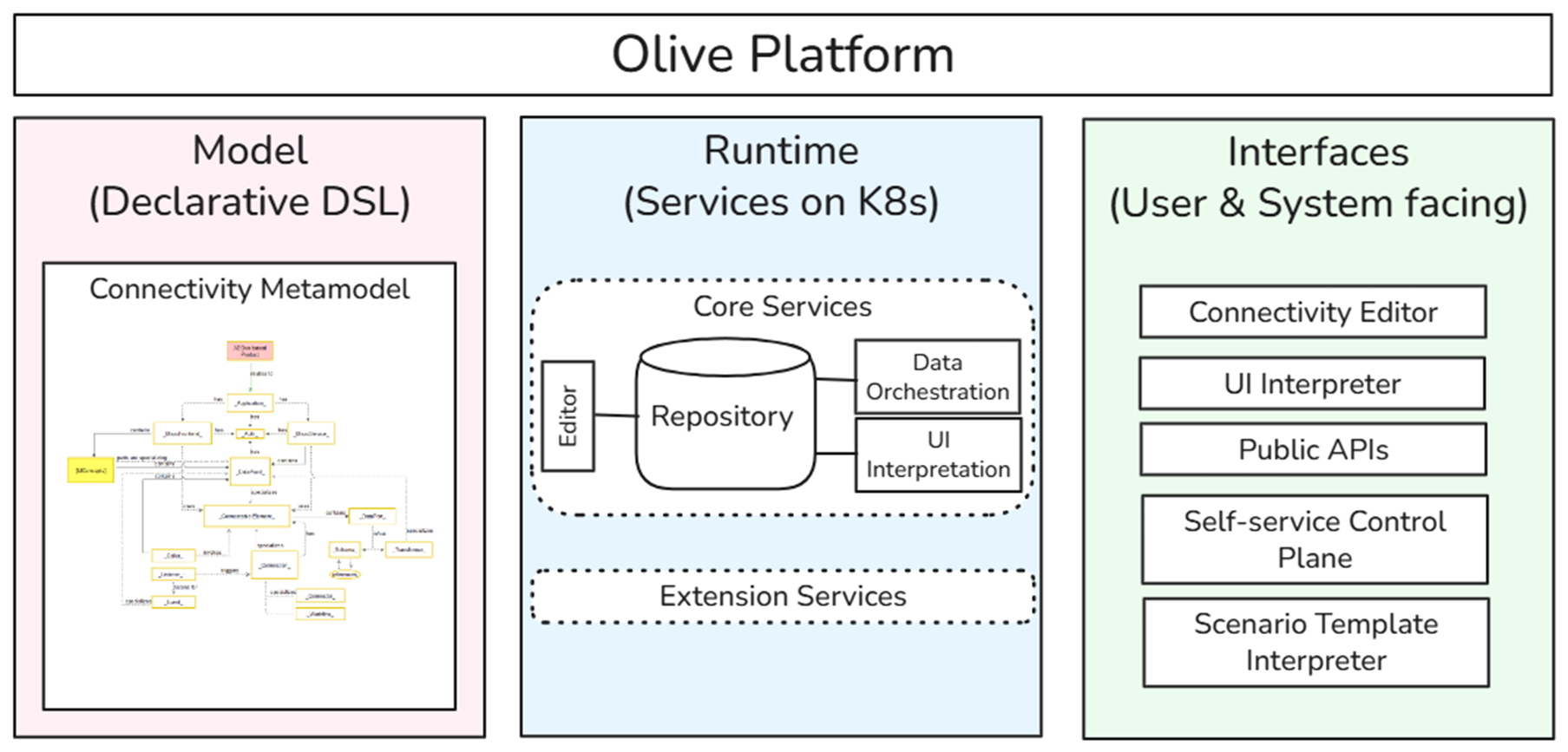
Platform Core Architecture
Overview
The OLIVE Core Services form the backbone of the platform, enabling model storage, connectivity orchestration, and dynamic UI generation.
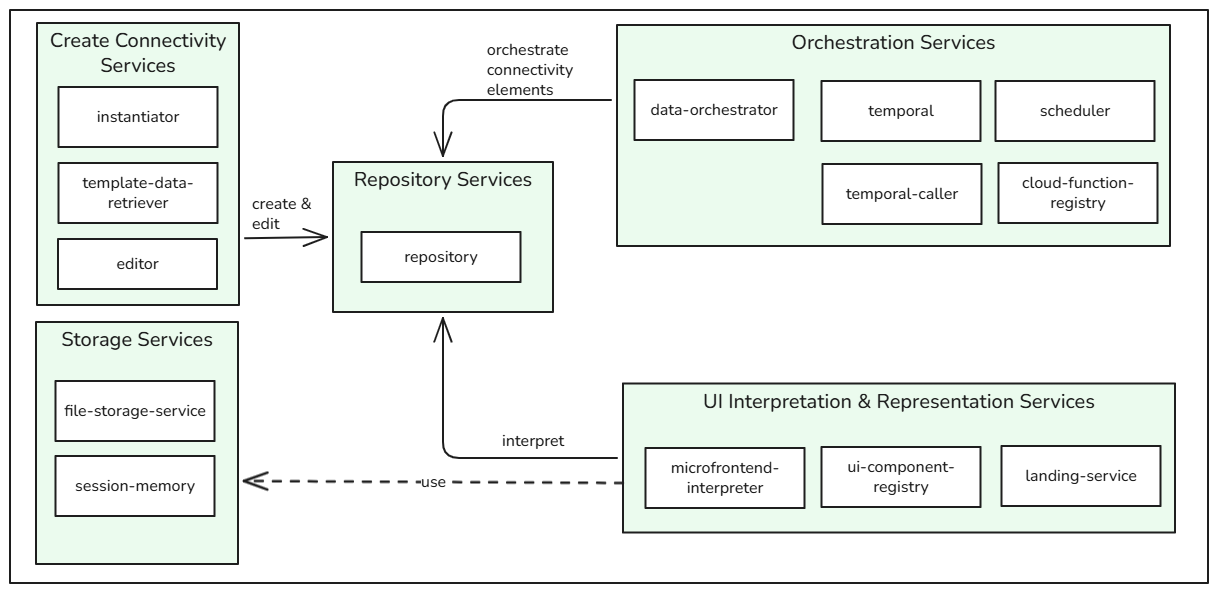
Core components:
- Create Connectivity Services – For creating and managing connectivity models.
- Repository Services – Central connectivity model registry.
- Orchestration Services – Connectivity engine for data and flow orchestration.
- UI Interpretation & Representation Services – Render UI components dynamically from models as well as providing convenience tools.
- Storage Services – File storage and session management utilities.
Naming Improvements in OLIVE Platform version 1.1.0
We improved the names of some core services in the OLIVE platform version 1.1.0.
Some services provide public RESTful APIs - in version 1.1.0 and 1.2.0 they can be invoked using the old and the new name.
For more information regarding the public RESTful APIs see: OLIVE Services - PublicAPIs
| Former Service Name | New Service Name |
|---|---|
| data-layer | data-orchestrator |
| service-lookup | repository |
| service-hub | editor |
| pilet-registry | ui-component-registry |
| piral | microfrontend-interpreter |
Detailed Architecture
Create Connectivity Services
- Manages CRUD operations on connectivity definitions.
- Provides validation, search, and filtering of configurations.
- Interfaces with the Repository Services for model persistence.
- Allows instantiating OLIVE applications from templates or from scratch.
Repository Services
- Validates model instances via JSON Schema and TS types.
- Manages references and dependencies between services.
- Provides CRUD interfaces for connectivity instances and schemas.
Orchestration Services
- Executes and orchestrates connectivity flows.
- Supports connectivity invocation and monitoring of orchestration state.
- Orchestration can be triggered by request by API, via the UI, or scheduled via the Scheduler Service.
- In a production environment, connectivity processes that run for an extended period may fail.
This occurs because the temporary access permission used during the process can expire and is not automatically renewed.
As a workaround, the validity period of this access permission can be increased in the Identity and User Manager (e.g. Keycloak) to ensure it remains active for the duration of longer-running processes. Appropriate settings are documented in the Administrator Handbook. This limitation does not affect developer environments.
UI Interpretation & Representation Services
- Translates model definitions into interactive microfrontends.
- Includes CRUD UI components and microfrontend interpretation.
Storage Services
- File Storage Service: Store/retrieve files that can be kept long-term.
- Session Memory: Handle runtime sessions for small amounts of data.
Metamodel
More details and information about the metamodel can be found here: Metamodel.
Conceptual Overview
The metamodel defines the formal structure and semantics for all connectivity and UI assets in OLIVE.
It includes:
- A Conceptual Meta Model (graphical and textual documentation of relationships and meaning).
- A JSON-based Implementation Model using JSON Schema for runtime validation.
- TypeScript types for compile-time enforcement.
Adaptation
The metamodel can be extended by:
- Defining new concepts in the repository.
- Implementing corresponding TypeScript services.
- Registering them in the Data Orchestration Layer.
Usage
The metamodel can be used by:
- Editors (e.g., JSON editor, templates) to define models.
- APIs in the Orchestration Layer for model execution.
- UI components or public APIs to trigger data orchestration.
Extensibility Model
The OLIVE Platform is designed for extensibility without altering the core.
You can extend it by:
- Implementing Extension Services (new data point handlers, API connectors).
- Registering them within the Data Orchestration Layer.
- Adding corresponding types and schema definitions.
Example extensions:
- MCP Server Integration
- Prompt & Agent Extensions
- Vector Storage
- Other domain-specific services
Purpose: specialize OLIVE for specific domains without changing core.
Platform Interfaces
The platform exposes multiple interaction points:
| Interface | Audience | Purpose |
|---|---|---|
| Connectivity Editor | Developers | Create and manage connectivity models |
| Scenario Template Interpreter | Integrators | Configure reusable scenarios |
| Microfrontend Interpreter | End Users | Render descriptive UI applications |
| Public REST APIs | Automation / DevOps / Developers / End Users | Integrate OLIVE into pipelines and scripts |
| Self-Service Control Plane | Operators | Manage tenants and monitor deployments |
Security Model
Overview
The OLIVE Platform implements a tenant-aware security model to ensure secure authentication, authorization, secret management, and resource isolation for production environments.
Security is governed by two foundational components:
- Keycloak – for identity and access management (IAM) with OIDC/OAuth2 token-based authentication.
- HashiCorp Vault – for secure handling of all sensitive secrets and credentials.
Both components are part of the Common Infrastructure, ensuring consistent security enforcement across all tenants while maintaining logical and operational separation.
Authentication and Authorization (Keycloak)
Keycloak acts as the central identity provider (IdP) for all OLIVE tenants and platform components.
Tenant Onboarding
- Each tenant receives a dedicated Keycloak realm during onboarding.
- A tenant admin user is automatically created and granted full configuration rights.
- The tenant admin can then manage users, roles, and realm settings independently.
This design guarantees identity-level isolation while enabling self-service user management.
Roles and Permissions
The platform enforces three permission levels — user, editor and admin. What each one may do is described in Roles In OLIVE – Platform Permissions. In Keycloak they map as follows:
| Permission level | Keycloak realm role |
|---|---|
| admin | realm role admin, usable for clients and users |
| editor | realm role editor, usable for clients and users. Introduced with OLIVE Platform version 1.1.0 |
| user | the realm default; no additional realm role is assigned |
The realm also ships two groups as the simplest way to assign these: /admins, which grants both "admin"
and "editor" — and therefore combines the two privileged sets in one account — and /users, which grants
ordinary user access. Prefer assigning the individual realm role where the separation matters.
OIDC and OAuth 2.0 Flows
Both user-to-machine (U2M) and machine-to-machine (M2M) authentication flows are supported via OIDC.
On tenant creation, three Keycloak clients are registered: olive-gateway-user, olive-gateway and
olive-gateway-admin, whose service accounts hold no realm role, the realm role editor and the realm
role admin respectively. What each client may do, and which one a caller should use, is covered in
API Access with OIDC Clients.
These clients issue scoped JWT access tokens that define the user’s or service’s authorization level. Direct access grants (sending a username and password straight to the token endpoint) are disabled. The client secrets are credentials in their own right — anyone holding the olive-gateway-admin secret can act as an administrator of that tenant without logging in.
Authentication Proxy
All OIDC flows are mediated by OAuth2 Proxy, which:
- Handles redirects, logins, and token validation.
- Ensures only authenticated requests reach OLIVE’s internal APIs or UI layers.
Secret and Credential Management (HashiCorp Vault)
HashiCorp Vault manages all sensitive credentials, including:
- API keys
- Access tokens
- Third-party service credentials
- Encryption keys
Tenant Isolation
Vault enforces tenant-level isolation through distinct namespaces or secret paths.
Each tenant’s secrets are segregated, and access policies ensure that no cross-tenant secret access is possible.
Integration
OLIVE services interact with Vault through secured API calls for:
- Retrieving secrets on-demand (just-in-time usage).
- Storing encrypted configuration data.
- Rotating credentials periodically or upon revocation.
This approach prevents embedding credentials in configuration files or metamodel definitions and supports secure multi-tenant operations.
Compute and Storage Isolation
To balance efficiency and security, OLIVE adopts a hybrid multi-tenancy model:
-
Compute Resources (containers, runtimes, orchestration workers) are shared across tenants to optimize resource utilization and scaling.
-
Stateful Storage Components (databases, Vault namespaces, file-storage services) are provisioned per tenant, ensuring:
- Isolation of tenant data and metadata.
- Clear separation of orchestration state, configurations, and results.
- Reduced risk of data leakage or unauthorized access between tenants.
This design enables secure isolation of data while maintaining elastic compute scalability and efficient use of infrastructure.
Token and Session Security
- All access tokens issued by Keycloak are JWTs, digitally signed for integrity verification.
- Refresh tokens extend session lifetimes where applicable but currently not implemented in data-orchestration.
- You can adapt the token timeout in Keycloak, see the official documentation: https://www.keycloak.org/docs/latest/server_admin/index.html?#_timeouts
- Session data is stored in the Session Memory Service, isolated per tenant context.
Operational Security Considerations
- Multi-Factor Authentication (MFA): Supported per-tenant, configurable via Keycloak realm settings.
End-to-End Flow – “How It All Fits”
- Design connectivity in the metamodel (validated JSON + TS types)
- Store and version in the repository
- Invoke orchestration via UI or public API
- Execute through orchestration services and collect results
- Render UI dynamically via the interpreter
- Extend platform with domain-specific extensions
- Deploy and operate in Kubernetes using cloud-agnostic infrastructure