4.3 How to Integrate AI
Here, OLIVE calls the AI: a solution that uses an LLM or an agent as part of its own execution. The opposite direction — an AI agent application such as ChatGPT or Claude calling OLIVE, to query content, create connectivity and execute it — is described in Using OLIVE from AI Agent Applications.
In the previous chapter, we covered the basics of creating connectivity with OLIVE. In this section, we will go a step further and explore how to integrate AI into an existing application.
Example Scenario
The chatbot connects ADONIS with OpenAI services to explain models in natural language. This showcases how AI can be embedded into existing enterprise tools to provide intelligent assistance. The required infrastructure extensions (for example, a vector database) are included in the OLIVE Platform 1.1.0 release. Please note that these extensions are currently provided in a prototype state.
Prerequisites
Before starting, you will need:
- Valid access credentials for OpenAI.
- Valid access credentials for ADONIS.
What You Will Learn
Through this example, you will learn how to:
- Work with access credentials required for connectivity use cases.
- Apply OLIVE Connectivity to access ADOxx-based products like ADONIS in a practical scenario.
This example accesses a vector database. Since OLIVE 1.3, the datapoints and services it needs are no longer shipped with the platform release, so you cannot run the example exactly as shown. It is still the reference for how to call an AI service from connectivity and how to structure a use case, and you should read it with that purpose in mind.
How to Integrate AI – Key Considerations
When integrating AI into applications using OLIVE, there are three fundamental questions you should always address. These serve as a checklist to ensure your connectivity use case is secure, compliant, and technically sound.
1. Access Credentials
Question: Which systems are involved, and how do you securely store and manage their keys?
- AI integrations often require multiple credentials (e.g., OpenAI for AI services, ADONIS for process models).
- Secure storage and management of these keys is critical to prevent misuse.
- OLIVE supports working with credentials.
2. Data Policies
Question: What rules apply to the data you’re using?
- Consider privacy, compliance, retention, and ownership of the data being exchanged.
- AI services often process sensitive or proprietary content — it’s essential to check whether this data can leave your organization and under what conditions.
- Clear policies must be applied before deploying any AI-enhanced connectivity scenario.
3. Connectivity Concepts
Question: How do you connect the AI service to your tools?
- This involves designing the actual data flow between your application and the AI provider.
- For example, in the ADONIS Chatbot case, OLIVE connectivity ensures meeting context or model information is passed securely to OpenAI, and the response is delivered back into ADONIS.
- Defining these connections explicitly avoids ambiguity and ensures reliable operations.
Why These Questions Matter
No matter what AI use case you are designing, you will need to work through all three of these considerations. They form the backbone of any responsible AI integration.
In our Chatbot example, you’ll see exactly how each of these aspects is addressed in practice.
User Story & High-Level Connectivity
User Story
As a user, I want to ask a question in plain language and receive the relevant information from ADONIS.
Concept
In this use case, the goal is to make interaction with the ADONIS repository more intuitive. Instead of navigating through complex menus or searching manually, the user can simply enter natural language prompts.
The system interprets these prompts, retrieves the most relevant information from ADONIS, and delivers the answer back to the user. This creates a conversational interface that makes exploring and understanding repository data easier and faster.
High-Level Connectivity
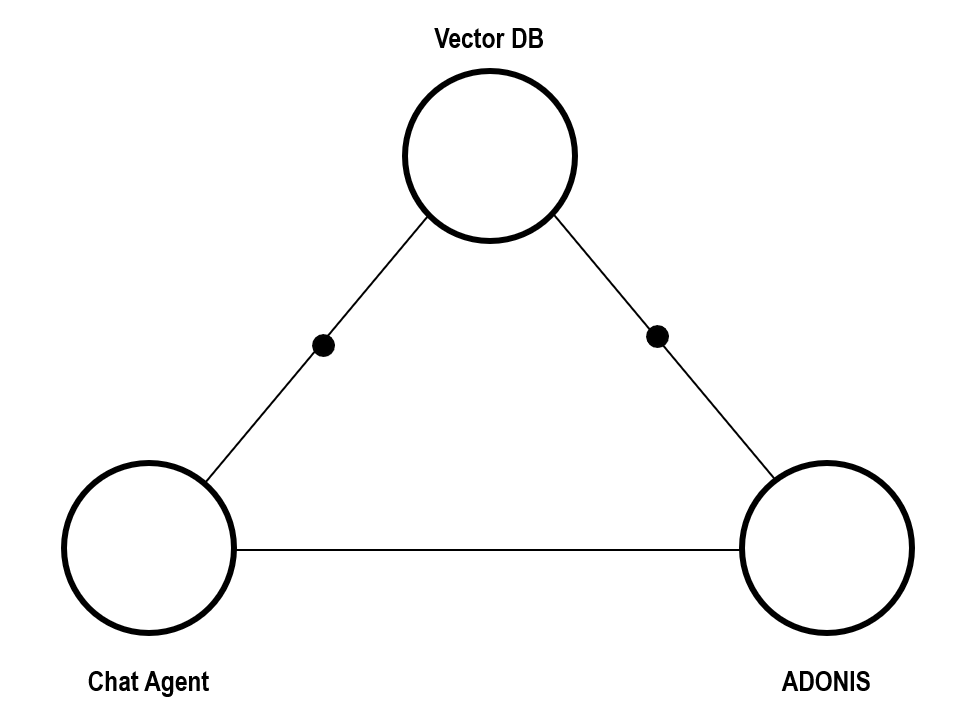
The connectivity scenario consists of three main components:
- Chat Agent: The interface where the user types questions in natural language.
- Vector Database: Helps process and interpret queries by matching them with relevant context or indexed knowledge.
- ADONIS: The source of truth where the actual repository data is stored and retrieved.
The interaction flow looks like this:
- The user submits a question to the Chat Agent.
- The Chat Agent consults the Vector Database to enrich or contextualize the query.
- The system then retrieves the relevant information from ADONIS.
- The Chat Agent returns the response to the user in plain language.
This combination provides a smooth and efficient user experience, enabling business users to interact with ADONIS without needing technical expertise.
Sketch the Idea
In the second phase of the methodology, we sketch the idea. This step serves as a checkpoint to make sure the basic elements of the use case are clearly defined before moving on to more detailed design and implementation.
Use Case
The chatbot scenario is straightforward:
- The user enters a prompt in natural language.
- The chatbot interprets the prompt and returns knowledge retrieved from ADONIS.
Business Requirements
The main requirements driving this use case are:
- Accessibility – make process data easy to access without the need for expert support.
- Efficiency – reduce the time and effort required to explore repository content.
Stakeholders
To succeed, this use case requires alignment across:
- Business users and analysts, who will actively use the chatbot to query data.
- IT administrators, who ensure proper setup, credentials, and compliance with security policies.
This phase is not about building yet — it is about ensuring clarity, alignment, and agreement on what we want to achieve and why it matters.
General Flow
The AI chatbot use case connects users with ADONIS repository data in a conversational way. Instead of manually searching or navigating, users simply interact with the chatbot through natural language prompts. The system then retrieves and delivers relevant information directly.
- User submits a prompt in the chatbot
The interaction begins when the user types a question or request in plain language, such as “Show me the processes related to customer onboarding.” - Vector Database search
The system translates the user’s prompt into a semantic search query. A Vector Database (Vector DB) is used to match the intent of the question with the most relevant data from the ADONIS repository. This enables more natural and accurate retrieval compared to simple keyword searches. - Response returned by the AI agent
The retrieved information is then rephrased by the AI agent into user-friendly language. If applicable, the response also includes direct links to ADONIS models so the user can explore the results further in context.
Process Visualization
The flow can be summarized as:
Prompt → Semantic Search → AI Response + Model Link
This streamlined interaction enables business users to quickly access and understand repository data without requiring expert knowledge of ADONIS.
From a technical perspective the steps are:

Authentication (Recap)
In the Hello World chapter, authentication was introduced as a core OLIVE concept and applied when calling an external AI service.
At this point, we therefore do not reintroduce authentication from scratch.
As shown in the Hello World example (How to Start - Hello World), the key benefits include:
-
- Separation of concerns – Datapoints never store secrets directly; they only reference an Auth object by ID.
- Reusability – The same Auth object can be linked to multiple datapoints.
- Centralized management – Credentials can be updated once in the Auth object and all linked datapoints automatically use the new value.
- Security – Prevents embedding sensitive data inside datapoint definitions.
This separation allows the same datapoint or connector to be reused across environments with different credentials.
For a detailed introduction to Auth configurations and supported authentication types, see Authentication and Secrets Management
Visualization in the Metamodel

The diagram shows how:
- A Datapoint can be linked to an Auth object.
- Different Auth specializations (BasicAuth, BearerToken) provide secure ways to store credentials.
- This ensures consistent, centralized authentication across all connectivity scenarios.
The auth element may not appear in every MM model visualization. However, in broader context diagrams such as How to Develop Connectivity or How to Integrate AI - Chat Agent to VectorDB - Mapping to the OLIVE Metamodel, its relationships and connections are shown.
Chat Agent to VectorDB – High-Level Connectivity
After completing the practical authentication exercise, we return to our use case example and look at the high-level connectivity.
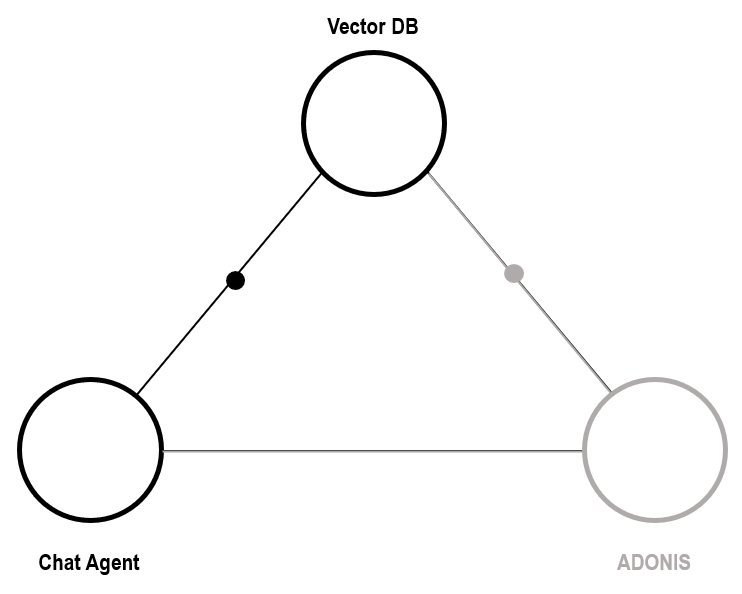
The first interaction we consider is the link between the Chat Agent and the Vector Database (VectorDB).
- The Chat Agent acts as the user-facing entry point. It receives natural language prompts from the user.
- These prompts are then passed to the VectorDB, which is optimized for semantic search and similarity queries.
- The VectorDB retrieves the most relevant entries based on the user’s request, effectively narrowing down the context from the larger dataset.
This connection ensures that the chatbot doesn’t just perform keyword searches, but instead uses semantic similarity to return meaningful results. It lays the foundation for the intelligent behavior of the AI chatbot, as it enables natural language queries to map to structured information in the ADONIS repository.
Next, we will extend this high-level view by looking at how the VectorDB connects to ADONIS, completing the overall flow.
Chat Agent to VectorDB – Mapping to the OLIVE Metamodel
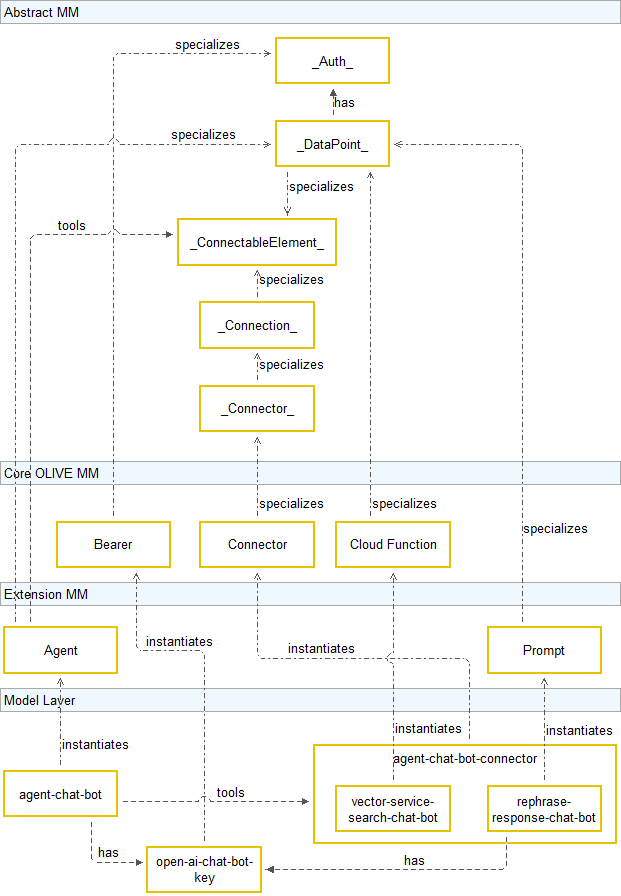
When building connectivity in OLIVE, each element must be mapped to concepts from the OLIVE Metamodel. This ensures a consistent structure and reusability across different scenarios.
1. Configure the Agent Datapoint
-
The Agent is a specialization of a datapoint within the OLIVE Extension Metamodel.
-
It orchestrates the entire workflow in an agentic manner:
- Accepts user prompts.
- Handles authentication.
- Calls external services such as the Vector Search or the OpenAI API.
-
In our case, the agent-chat-bot is the dedicated element that coordinates the chatbot interaction through the use of AI.
2. Configure the Vector Search Datapoint
- The Vector-service-search datapoint performs the semantic search inside the VectorDB.
- It processes the user query provided by the Agent and retrieves references to relevant ADONIS objects.
- This separation ensures that semantic search is handled independently and can be reused in other contexts.
3. Configure the Connection
-
Once the datapoints are defined, we configure the connection flow:
-
User prompt → Agent Datapoint
- The user’s natural language input is passed into the Agent.
-
Agent Datapoint → Vector Search
- The Agent calls the Vector Search service to retrieve semantically relevant results.
-
-
Optionally, the response can be rephrased or enriched before being returned to the Chat Agent.
Summary
By aligning the Agent and Vector Search datapoints with the OLIVE Metamodel, we ensure that connectivity is:
- Modular – each datapoint has a clear responsibility.
- Reusable – the Vector Search can be used by other scenarios.
- Secure – authentication is handled through the Agent.
This step shows how OLIVE’s modeling approach turns abstract connectivity into concrete, reusable building blocks.
Chat Agent to VectorDB – Data Flow
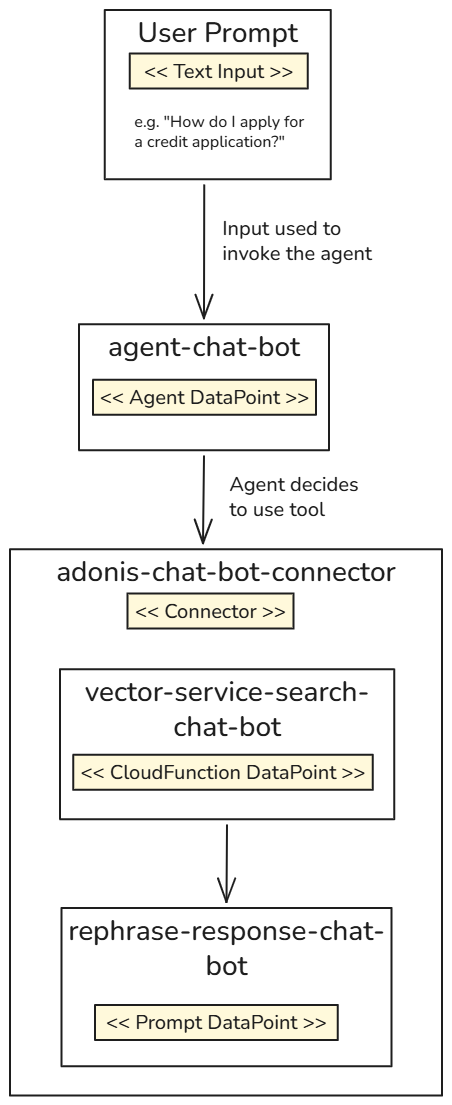
Once the connectivity has been defined, the execution of the ADONIS Chat Bot connector follows a clear step-by-step flow:
1. User Prompt
- The process begins when the user submits a prompt.
- This input is passed via the OLIVE DataLayer to the
agent-chat-botdatapoint.
2. Agent-Chat-Bot Datapoint
-
The
agent-chat-botdatapoint is of type Agent. -
It can be configured with its own model and extended with tool datapoints.
-
Its role is to evaluate the incoming prompt and decide which tools (datapoints) to invoke.
- In this example we just provide one tool
- The agent can also decide not to invoke any tool if the incoming question does not fit within the instructed guardrails
3. Triggering the Connector
- Based on the evaluation, the Agent triggers the
adonis-chat-bot-connector. - The connector orchestrates the execution of multiple datapoints in a predefined sequence.
4. Connector Execution Sequence
Inside the adonis-chat-bot-connector, two datapoints are executed:
-
Vector-Service-Search-Chat-Bot (Cloud Function)
- Uses the user’s prompt along with index definitions.
- Performs a vector search in the VectorDB.
- Returns references to relevant ADONIS objects.
-
Rephrase-Response-Chat-Bot (Prompt)
- Applies a system prompt to rephrase the raw output.
- Ensures the response is clear, structured, and user-friendly.
5. User-Friendly Output
- The final response is grounded in semantically relevant content retrieved from the vector database and is made easier to interpret through the subsequent rephrasing step.
- This makes the interaction intuitive for end-users while hiding the complexity of the underlying workflow.
Key Takeaway
The Agent acts as the decision-maker, the Connector orchestrates the sequence, and specialized datapoints (Vector Search + Rephrase) ensure that the final output is both relevant and accessible.
ADONIS to VectorDB – High-Level Connectivity
In the next step of our connectivity setup, we establish the relation between ADONIS and the Vector Database (VectorDB).
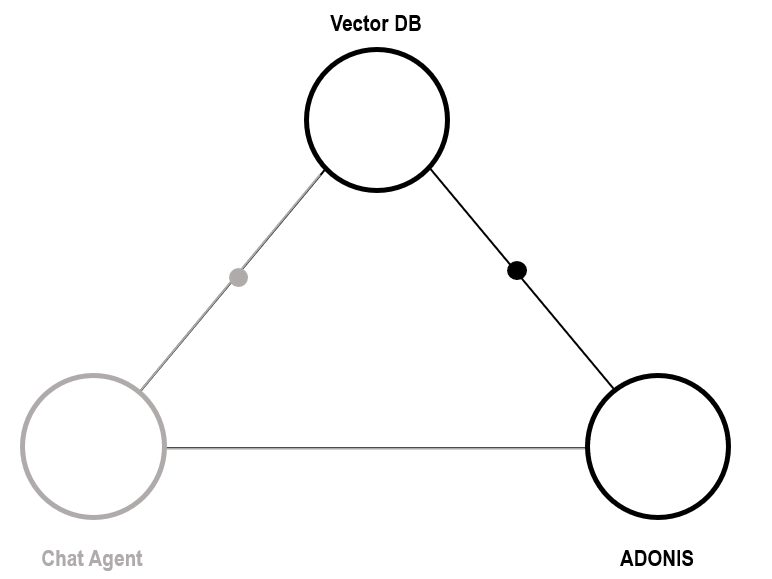
While the previous section focused on the Chat Agent’s interaction with the VectorDB, this part illustrates how ADONIS itself is connected. The goal is to show which datapoints and connectors are involved in this relation, without going into the detailed implementation steps.
- ADONIS acts as the source of structured process and repository data.
- This data is connected to the VectorDB, where it can be indexed, searched, and retrieved in response to user queries.
- A dedicated connector manages this interaction, making sure that ADONIS data is correctly processed and represented inside the VectorDB.
- The datapoints created in OLIVE serve as the formal definitions of this integration: one side represents the ADONIS repository, the other side represents the VectorDB.
This relationship completes the triangular setup:
- Chat Agent ↔ VectorDB for user queries,
- ADONIS ↔ VectorDB for providing semantic data,
- Together enabling the AI-powered chatbot to retrieve and explain process knowledge.
Key Takeaway
This step illustrates the data provisioning flow from ADONIS into the VectorDB, setting the foundation for intelligent, AI-driven search and retrieval, while keeping ADONIS as the authoritative source of truth.
Authentication to ADONIS
Before ADONIS can be integrated with AI, we first need to establish secure access to its data through the ADONIS REST API. This is done by creating a new Auth entry in the OLIVE repository.
In this case, the authentication method is HTTP Basic Auth. That means:
- You provide a username and password corresponding to valid REST login credentials in your ADONIS instance.
- These credentials are stored securely in the Auth object, and never hardcoded directly into datapoints.
- The datapoints can then reference the Auth object, ensuring reusability and central management of credentials.
Example: JSON Auth Definition
{
  "id": "base-a-adonis_rest-auth-ai-modelling",
  "name": "base-a-adonis_rest-auth-ai-modelling",
  "type": "auth",
  "version": "0.0.1",
  "displayName": "base-a-adonis_rest-auth-ai-modelling",
  "tags": [
    "example",
    "simple-example",
    "scenario-example-base",
    "scenario-example-base-auth"
  ],
  "auth": {
    "type": "basicauth",
    "secret": {
      "key": "restKey",
      "value": {
        "user": "{your-user}",
        "password": "{your-password}"
      }
    }
  }
}
Key Points
- This Auth entry establishes the secure foundation for ADONIS-to-VectorDB connectivity.
- Credentials can be updated centrally without modifying individual datapoints.
- This approach reduces risk, avoids embedding sensitive data, and makes authentication configurable, reusable, and secure.
Fetching Data from ADONIS
After creating authentication credentials for ADONIS, the next step is to actually fetch data via the REST API.
Step 1: Create a new HTTP Datapoint
- This datapoint retrieves a model from ADONIS.
- It requires the repository ID and model ID as input parameters.
- It uses the auth entry we defined in the previous step (
adonis-rest-auth-ai-modelling) to ensure secure access. - The
urlmust point to your ADONIS instance and be available from the public internet.
Example JSON Definition
{
  "id": "base-dp-adonis_rest-get-model",
  "name": "base-dp-adonis_rest-get-model",
  "type": "datapoint",
  "version": "0.0.1",
  "displayName": "base-dp-adonis_rest-get-model",
  "tags": [
    "simple-example",
    "example",
    "scenario-example-base",
    "scenario-example-base-datapoints"
  ],
  "description": "Sample datapoint showing how to call the Adonis REST API to fetch a specific model via repo + model identifiers.",
  "deprecated": false,
  "datapoint": {
    "type": "http",
    "http": {
      "url": "https://adonis.example/rest/3.0/repos/${input.REPO_ID}/models/${input.MODEL_ID}",
      "method": "GET"
    },
    "auth": "base-a-adonis_rest-auth-ai-modelling"
  }
}
Step 2: Extend to Other Use Cases
In a similar way, you can define additional datapoints for:
- Modelling instances – to retrieve specific model elements.
- Repository instances – to fetch broader repository-level data.
By adjusting the REST API endpoint in the datapoint definition, you can cover different ADONIS data access scenarios.
Key Takeaway
Authentication and datapoints work hand in hand — credentials stay secure in the Auth object, while datapoints remain clean and reusable with placeholders for input.
Next Steps – Preparing and Storing ADONIS Data in a VectorDB
Once the connection to ADONIS is established and you can fetch data through REST datapoints, the next logical step is to make this information usable for the Chat Agent by storing it in a Vector Database (VectorDB).
Step 1: Convert ADONIS Data for Vectorization
- Raw ADONIS data is typically delivered in JSON format.
- Before storing it in the VectorDB, the content should be transformed into a text-based representation that captures the business meaning.
- Metadata can be included, but the main focus should be on textual descriptions that can be vectorized meaningfully.
Step 2: Vectorize the Content
- Apply vectorization techniques (embedding models) to transform the textual data into vector representations.
- These vectors allow semantic search – meaning queries in natural language can retrieve the most relevant ADONIS content.
Step 3: Store in the Vector Database
- Insert the vectorized data into the VectorDB.
- Ensure each vector entry maintains references to the original ADONIS objects (e.g., model IDs or repository IDs), so results can be traced back.
Step 4: Run the Workflow at Scale
-
Once the process is defined, it can be batch executed:
- Fetching data from ADONIS
- Vectorizing it
- Storing it in the VectorDB
-
This allows you to prepare entire repositories for use in the chatbot scenario.
Simplification for Training
Because the detailed JSON definitions and scripts for this step are more technical and repetitive, they are not covered in full in this training.
However, complete reference implementations are provided in the default OLIVE examples, which you can explore for deeper understanding.
Key Takeaway
The transition from ADONIS data → text → vectors → VectorDB storage is what enables the chatbot to provide meaningful, natural-language answers backed by repository knowledge.
Chat Agent Linking to ADONIS
In this final part of the connectivity flow, we look at the relationship between the Chat Agent and ADONIS.
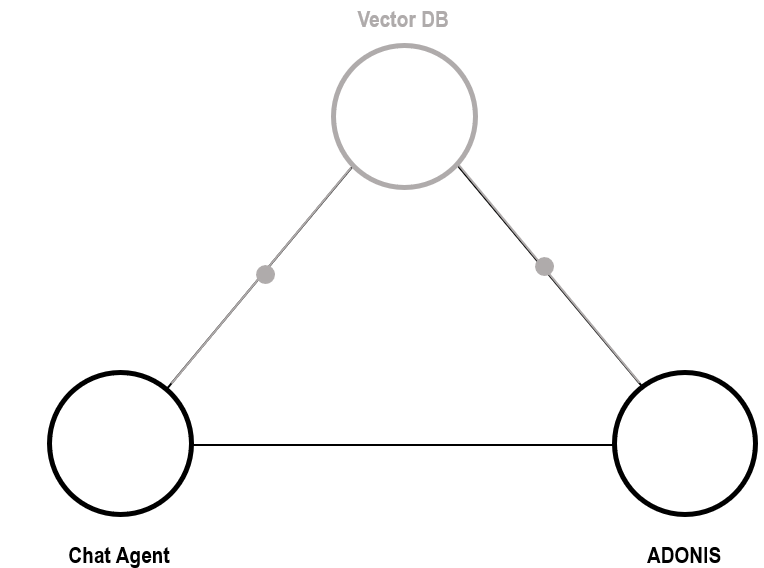
Unlike the earlier connections (to the Vector Database or within the connector logic), this link is lightweight and serves a very specific purpose.
Functionality
- When the Chat Agent receives a user query, it may retrieve relevant ADONIS models as part of the result.
- Instead of embedding the full model or duplicating repository content, the Chat Agent simply provides a direct URL to the ADONIS model.
- This link allows users to open the referenced model in ADONIS, ensuring that they always access the most current version directly from the repository.
Why This Matters
- Keeps ADONIS as the single source of truth for process models.
- Avoids duplication of data and ensures that users can interact with live, up-to-date repository content.
- Simplifies integration, since no deep synchronization between the Chat Agent and ADONIS is required — only a reference needs to be passed.
Key Takeaway
The Chat Agent’s role here is not to replicate ADONIS functionality, but to enhance accessibility: it translates natural language queries into actionable insights and provides direct entry points into ADONIS for further exploration.
End Result: Users can intuitively query the repository in plain language through the Chat Agent and immediately jump into ADONIS to view the referenced model in detail.
Lessons Learned
Having completed the walkthrough of the full interaction between the Chat Agent, ADONIS, and the Vector Database, we can now summarize the key takeaways from this training module.
1. Dealing with Access Credentials
- We explored how to securely manage access by creating an authentication configuration for the ADONIS REST API.
- This highlighted the importance of separating credentials from datapoints and using dedicated Auth objects in OLIVE.
2. Applying Access to ADOxx-Based Products in Practice
- With authentication in place, we were able to connect to ADONIS and make use of its public API endpoints.
- This demonstrated how OLIVE connectivity can bridge AI services with existing ADOxx-based tools.
3. Fetching Data from ADONIS
- Finally, we saw how to fetch repository data such as models or instances from ADONIS via REST.
- This forms the foundation for later steps like vectorization and making data accessible to AI agents.
Key Takeaway
By securing credentials, applying access via public endpoints, and retrieving ADONIS data, we have established the building blocks for integrating AI into ADOxx-based products — and set the stage for advanced use cases like intelligent chat agents.