6.8 Authentication and Secrets Management
Authentication for Connectivity
Enabling & configuring authentication
Some datapoints that call external APIs need authentication. The recommended way to have authentication for datapoints is to use Auth entries that can be referenced in the Datapoint. More details on how to use Auth entries can be found in 6.2 Datapoints
Whether a datapoint needs credentials is decided by the system it calls, not by the kind of OLIVE deployment it runs in. A datapoint that calls OpenAI or ADONIS needs an Auth entry from your very first scenario, in a development deployment just as in production.
The one thing that differs between deployments is authentication to OLIVE itself — its public APIs accept anonymous calls in a development deployment and require a token in production. That is a separate case, covered in Calling OLIVE's own APIs from connectivity below.
Some details about Auth entries:
- Only Datapoints can have auth
- The secret values of an Auth entry are stored securely inside the OLIVE platform
- Auth entries can contain placeholders and be filled and instantiated from templates
OLIVE supports the following auth types: Basic auth, Bearer token auth, OAuth2, OpenID Connect (OIDC)
auth.type values and their secrets
The value of auth.type is matched case-insensitively against this list. The shape of secret.value
depends on which type is chosen.
auth.type | Mechanism | secret.value |
|---|---|---|
basicauth | HTTP Basic | { "user": "…", "password": "…" } |
bearer | Authorization: Bearer <token> | the token, as a plain string |
oauth2 (also accepted: oauth) | OAuth 2.0 client credentials | { "clientId", "clientSecret", "tokenUrl" } required; scope, audience, grantType, credentialsInBody optional |
oidc | OpenID Connect client credentials | { "clientId", "clientSecret", "authUrl" } required; audience, organization optional |
How secret.key and secret.value work together
An Auth entry has a secret with two fields, and they do different jobs:
| Field | Purpose |
|---|---|
secret.key | Which property to take out of the stored secret, when the stored secret is an object |
secret.value | What the datapoint sees at execution time, after the secret has been resolved |
The stored secret is looked up in Vault by the id of the auth entry — not by secret.key. What
happens next depends on what is stored:
- If the stored secret is a plain string, it becomes
secret.valueandsecret.keyis not used. - If the stored secret is an object,
secret.keynames the property to take from it. An entry with"key": "OpenAIKey"resolves to theOpenAIKeyproperty of the secret stored under that auth entry's id.
What you write into secret.value in the definition is a placeholder for the real credential — either a
literal you replace, or ${template.<field>} when the value is supplied at template instantiation. It is
never the credential itself in a definition you keep.
The shape secret.value must resolve to depends on the auth type:
auth.type | secret.value resolves to |
|---|---|
bearer | the token, as a plain string, used verbatim in Authorization: Bearer <value> |
basicauth, oauth2, oidc | an object with the fields listed in the table above. A JSON string is also accepted and parsed |
Notes on the optional OAuth2 fields:
grantTypedefaults toclient_credentials. Pass the literal value, not a placeholder.credentialsInBodydefaults tofalse, which sends the client credentials as an authorization header. Set it totrueto send them in the request body instead.
auth.type silently skips authenticationIf auth.type does not match one of the values above, the request is sent without credentials. A
warning is written to the service log, but the datapoint does not fail and the call usually comes back as
a 401 from the target system — which looks like a credential problem rather than a typo in the
definition.
So basic instead of basicauth, or oauth1, or a misspelling such as oath2, all produce an
unauthenticated request. Check the spelling against the table above when a datapoint that looks correctly
configured is rejected by the target API.
Authentication types
Basic auth
Basic auth is the most simple http authentication using a username and password.
Example:
{
  "id": "base-a-basic-auth",
  "name": "base-a-basic-auth",
  "type": "auth",
  "version": "0.0.1",
  "displayName": "base-a-basic-auth",
  "description": "Example Basic Authentication configuration using a static username and password. This auth definition can be referenced by HTTP-based datapoints that require Basic Auth credentials.",
  "tags": [
    "example",
    "simple-example",
    "scenario-example-base",
    "scenario-example-base-auth"
  ],
  "auth": {
    "type": "basicauth",
    "secret": {
      "key": "restKey",
      "value": {
        "user": "{your-user}",
        "password": "{your-password}"
      }
    }
  }
}
This would result in a http request with the headers:
Authorization: Basic <Base64 encoded YOUR_USER_NAME:YOUR_VERY_SECRET_KEY>
Bearer token
Bearer tokens are a simple token based API authentication.
Example:
{
  "id": "base-a-bearer-api-key",
  "type": "auth",
  "version": "0.0.1",
  "name": "base-a-bearer-api-key",
  "displayName": "base-a-bearer-api-key",
  "description": "Bearer token authentication configuration for API key-based authentication. This auth configuration can be referenced by datapoints that require API key authentication using the Bearer token scheme.",
  "tags": [
    "example",
    "simple-example",
    "scenario-example-base",
    "scenario-example-base-auth"
  ],
  "auth": {
    "type": "bearer",
    "secret": {
      "key": "base-a-bearer-api-key",
      "value": "{your-token}"
    }
  }
}
This would result in a http request with the headers:
Authorization: Bearer THE_ACTUAL_SECRET_TOKEN
OAuth2
The OAuth2 protocol is mostly used to authenticate against centralized identity providers and to verify the user has the necessary access to a certain scope. Note that at this point OLIVE only supports machine-to-machine authentication with OAuth2, where no user interaction is required.
Note: Not all features of OAuth2 are supported at the moment - for example refresh tokens or JWT authentication using OAuth2 are not supported yet.
For more information about OAuth see https://oauth.net/2/
{
  "id": "base-a-oauth-auth",
  "type": "auth",
  "version": "0.0.1",
  "name": "base-a-oauth-auth",
  "displayName": "base-a-oauth-auth",
  "description": "Example OAuth 2.0 authentication configuration using client credentials. This auth definition can be referenced by datapoints that require bearer token authentication obtained from an OAuth token endpoint.",
  "tags": [
    "example",
    "simple-example",
    "scenario-example-base",
    "scenario-example-base-auth"
  ],
  "auth": {
    "type": "oauth",
    "secret": {
      "key": "base-a-oauth-auth",
      "value": {
        "clientId": "{your-client-id}",
        "clientSecret": "{your-client-secret}",
        "tokenUrl": "https://auth.example.com/oauth2/token",
        "scope": "read:items write:items",
        "audience": "https://api.example.com",
        "grantType": "{client-credentials}"
      }
    }
  }
}
OpenID Connect
The OIDC protocol is mostly used to authenticate against centralized identity providers.
For using and configuring OIDC for OLIVE APIs see API Access with OIDC Clients
For more information on OIDC in general see https://openid.net/developers/how-connect-works/
{
  "id": "base-a-oidc-auth",
  "type": "auth",
  "version": "0.0.1",
  "name": "base-a-oidc-auth",
  "displayName": "base-a-oidc-auth",
  "description": "Example OpenID Connect (OIDC) authentication configuration using client credentials to obtain an access token from an OpenID Connect token endpoint. This auth definition can be referenced by datapoints that require bearer token authentication via an OIDC-compliant identity provider.",
  "tags": [
    "example",
    "simple-example",
    "scenario-example-base",
    "scenario-example-base-auth"
  ],
  "auth": {
    "type": "oidc",
    "secret": {
      "key": "base-a-oidc-auth",
      "value": {
        "clientId": "{your-client-id}",
        "clientSecret": "{your-client-secret}",
        "authUrl": "https://auth.example.com/oidc/token",
        "audience": "https://api.example.com",
        "organization": "{your-organization}"
      }
    }
  }
}
Calling OLIVE's own APIs from connectivity
A connectivity solution often calls OLIVE itself: reading or writing a file through the file-storage-service, keeping state in the session-memory, triggering another connectable element through the data-orchestrator. The usual way to do this is a plain HTTP datapoint pointing at the public API of the environment.
Most OLIVE users today work in a development deployment, which has no authentication: the public APIs accept a request without any credentials, so an HTTP datapoint with nothing but a URL and a method works.
The moment the same solution runs in an authenticated deployment the identical datapoint is rejected — typically with 401 Unauthorized if the client lacks the role. Nothing in the definition changes; the environment does.
An HTTP datapoint that targets an OLIVE API needs an auth reference before the solution goes into productive use in an authenticated environment. Why, and the second change that goes with it, is described in The two changes you will almost always have to make.
What has to be added
Add an Auth entry of type oidc and reference it from the datapoint. OLIVE then performs a machine-to-machine client-credentials flow before the request and sends the resulting token as Authorization: Bearer <token>.
The credentials are those of a client provisioned during tenant onboarding — olive-gateway-user, olive-gateway or olive-gateway-admin. Which one to use, what each may do, and how to obtain its secret from Keycloak is described in API Access with OIDC Clients.
olive-gateway-user covers almost every datapoint that calls an OLIVE API — a datapoint that reads or
stores a file, for example, needs nothing more. What each client may do is listed in
Accessing OLIVE APIs in Production Environment Deployments.
The auth entry:
{
  "id": "base-a-oidc-olive-platform",
  "type": "auth",
  "version": "0.0.1",
  "name": "base-a-oidc-olive-platform",
  "description": "OIDC auth entry for calling OLIVE's own public APIs.",
  "auth": {
    "type": "oidc",
    "secret": {
      "key": "base-a-oidc-olive-platform",
      "value": {
        "clientId": "olive-gateway-user",
        "clientSecret": "{your-client-secret}",
        "authUrl": "https://{your-keycloak-host}/realms/{your-realm}/protocol/openid-connect/token"
      }
    }
  }
}
And the datapoint referencing it:
{
  "id": "base-dp-http-olive-api-auth",
  "type": "datapoint",
  "version": "0.0.1",
  "name": "base-dp-http-olive-api-auth",
  "description": "Reads a file from the OLIVE file-storage-service through the public API.",
  "datapoint": {
    "type": "http",
    "http": {
      "url": "https://api.<tenant>.<cluster>.<domain>/file-storage-service/get?key=${input.key}",
      "method": "GET"
    },
    "auth": "base-a-oidc-olive-platform"
  }
}
The authUrl is the OpenID Connect token endpoint of the environment's Keycloak realm, in the form https://<keycloak-host>/realms/<realm>/protocol/openid-connect/token. audience and organization are optional and only needed if the identity provider requires them. The client secret is stored in Vault like any other secret value — it is never part of the exported definition.
auth reference belongs inside the datapoint objectIt is resolved as datapoint.auth. It can be either the id of an auth entry, as above, or a placeholder such as ${input.authID} when the entry is chosen at invocation time — see 6.2 Datapoints. Only datapoints can carry auth; connectors and workflows cannot.
A token is requested each time the datapoint executes, so a solution that calls OLIVE APIs in a loop performs one token request per call.
Keeping a solution portable across environments
Both the API host and the auth entry differ per environment. To avoid editing datapoints for every environment:
- Put the API base URL into an
environmentelement, a placeholder or a template parameter rather than writing a concrete host such ashttps://api.acme.prod.yourdomain.com/into the datapoint. See Environment variables (env). - Instantiate the Auth entry from a template, so that each environment gets the same entry
idwith its own client and secret. The datapoint can then reference that oneideverywhere. - Add the auth reference while still developing, even though the development environment ignores it. An auth entry that points at the development Keycloak, or an entry whose secret is filled only in the target environment, is cheaper than discovering the gap during a production rollout.
For a detailed guide on what to look out for before deploying your solution in a production environment refer to From a Development Deployment to Production
Authentication and Secrets Management for OLIVE environments
Overview
When editing an entry of type auth, the system may prompt for authentication before allowing access to sensitive information.
This behavior depends on the deployment mode:
- Authenticated deployments using Keycloak.
- Unauthenticated deployments (e.g. single-no-auth) use a lightweight local dialog for minimal protection.
Authentication Dialog
In single-no-auth mode, a dialog appears when attempting to view or edit secrets:
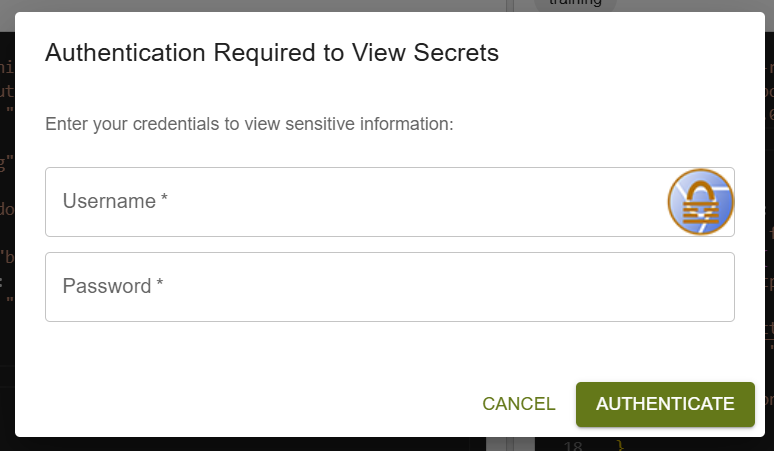
This dialog provides basic access control in development environments where Keycloak is not enabled.
In Keycloak-enabled environments, this dialog does not appear, since authentication and access control are handled through Keycloak.
Configuration in values.yaml
In unauthenticated setups, fallback credentials are defined in the Helm chart values file under the Express environment variables:
values.yaml
express:
  env:
    SINGLE_NO_AUTH_DEPLOY_USER: "olive"
    SINGLE_NO_AUTH_DEPLOY_PW: "olive"
Default credentials:
- Username: olive
- Password: olive
These can be overridden directly in your Helm values file, for example:
values.yaml override example
editor:
  express:
    env:
      SINGLE_NO_AUTH_DEPLOY_USER: "test"
      SINGLE_NO_AUTH_DEPLOY_PW: "test"
Security Notice
Important Security Notice
Never use single-no-auth mode in production.
This mode is intended only for development or testing purposes.
It offers minimal protection and should not be relied upon for securing real credentials or user data.
For production environments:
- enable Keycloak or another centralized identity provider.
- Do not store plain credentials in Helm values.
Secrets Storage (HashiCorp Vault)
All sensitive data from auth entries (e.g., API keys, tokens, passwords) are securely managed by HashiCorp Vault.
Even when running in single-no-auth, the backend secrets remain stored and managed in Vault — only the UI authentication changes.
Updating Credentials via Argo CD
If the deployment is managed through Argo CD, the correct way to change credentials or configuration values is to update them in Git and sync the application.
Steps
- Edit the Helm values.yaml in your Git repository:
 editor:
   express:
     env:
       SINGLE_NO_AUTH_DEPLOY_USER: "test"
       SINGLE_NO_AUTH_DEPLOY_PW: "test"
- Commit and push your changes to the repository.
- Open Argo CD and click Sync for the application.
Result:
Argo CD re-renders the Helm chart with the new values, applies the updated Deployment, and Kubernetes automatically restarts the pods with the new configuration.
No manual pod restarts or live manifest edits are needed.
Argo CD ensures the configuration and running state stay in sync with Git.
Related
- Security in Connectivity Engineering — where secrets may and may not appear, and what is written to the log