6.3 Naming Convention Guidelines
This document defines standardized naming conventions for IDs, Names, References, and Tags across scenarios, datapoints, connectors, UI components, and related artifacts located in the connectivity editor.
The goal is to ensure:
- Consistency across repositories and tools
- Readability and semantic clarity
- Technical compatibility
- Scalability as scenarios grow
The OLIVE Platform does not enforce or validate the naming conventions on this page. They exist so that repositories stay readable and consistent as they grow.
Two things are checked when a connector is registered, and neither is about character sets: every ref
in a connector must be unique, and every ${ref.…} and ${response.…} placeholder must point at a ref
that exists in that connector. See
Semantic Validation Rules.
Convention: IDs
Definition
IDs are unique identifiers used as keys.
Allowed Characters
- Lowercase letters:
a–z - Digits:
0–9 - Dash:
-
Rules
- Must start with a lowercase letter
[a-z] - After the first character, may contain
[a-z0-9\-] - No spaces
- No uppercase letters
- Avoid special characters other than dash
- The length should be < 255 characters although we are not enforcing it
ID Structure
[scenario-shorty]-[optional-scenario-section]-[purpose]-[optional-variant-or-enumerator]
Element Definitions
scenario-shorty | Short identifier for the scenario | Yes |
scenario-section | Logical subsection (e.g. c1, c2, ui) | Optional |
purpose | What the artifact does | Yes |
variant / enumerator | Version, instance number, or variation | Optional |
Example
"id": "ermtoowl-c2-xml-file-to-owl-1",
The example can be broken down as follows:
ermtoowl | scenario-shorty; indicates that the scenario relates to "erm-to-owl" |
c2 | scenario-section |
xml-file-to-owl | purpose; indicates that it converts an xml file to owl |
1 | variant / enumeration |
Convention: Names
Definition
Names are display names shown for example in the connectivity editor.
Allowed Characters
The goal is to allow commonly used, human-friendly characters while avoiding characters that are known to cause parsing, encoding, security, or interoperability issues.
- Letters (all languages, Unicode):
A–Z,a–z, and language-specific letters (e.g.ä ö ü Ä Ö Ü ß, Cyrillic, Greek, etc.) - Digits:
0–9 - Whitespace: Space
- Common special characters:
- _ ( ) { } [ ] * + / | < > ; : & . , ! ?
Disallowed Characters
- Quotation marks:
' " - Invisible or non-printing characters (e.g. non-breaking space, zero-width characters)
- Bidirectional or text-direction control characters
- Control characters (tabs, newlines, carriage returns)
- Any other Unicode characters with non-visual or text-altering behavior
Rules
- Should clearly indicate purpose
- Should be readable by non-technical users
- No strict length limit, but keep concise
Example
This example shows how a human-readable name communicates the purpose of an artifact more clearly than its technical ID. The name “Population Percentage Calculator (Math.js)” clearly indicates that the datapoint calculates a country’s population as a percentage of the global population using Math.js.

Convention: References (Refs)
References are used within a connectable element to access information of input, output, or other connectable elements that are part of the same connector or workflow.
In a connector or workflow you have to provide a name to the connectable element that it can be called.
Allowed Characters
- Letters:
a–z A–Z - Digits:
0–9(not as the first character) - Separators such as
_or-should not be used. Word boundaries are expressed using camelCase (see: https://en.wikipedia.org/wiki/Camel_case).
Rules
- Must start with a letter
- No dashes
- No spaces
- Should be short but meaningful
An underscore does work technically — the expression parser accepts [a-zA-Z_][a-zA-Z0-9_]* — but
camelCase is the convention used throughout the OLIVE examples, so keep to it.
Unlike the other conventions on this page, this one has a functional reason rather than a stylistic one.
A ref is read back through a JSONata expression — ${ref.locationInfo}. JSONata treats - as the
subtraction operator, so a ref named location-info makes ${ref.location-info} an arithmetic expression
over two unknown names, which evaluates to nothing. The element runs, the placeholder resolves to
empty, and no error is reported.
The name itself is accepted: ref is an ordinary string in the metamodel with no pattern constraint, so
nothing rejects location-info at registration. The failure appears later, as a datapoint that received an
empty parameter.
It is possible to quote the name in the expression — ${ref.`location-info`} works, and so do single
and double quotes — but every later reference then has to remember the quoting. Use camelCase instead.
Semantic Guidelines
The name of refs should describe what the output of the connectable element is not how it is implemented.
Example
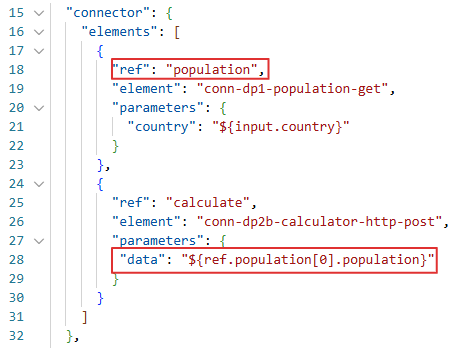
In this example below the element "conn-dp1-population-get" has the reference name "population".
This reference is then used in the second datapoint in the connector "conn-dp2b-calculator-http-post".
See also: Placeholder Resolution
Convention: Tags
Definition
Tags are semantic labels used for classification, filtering, and discovery.
Allowed Characters
- Lowercase letters:
a–z - Digits:
0–9 - Dash:
- - Underscore: _
Rules
- Must start with a lowercase letter
- No spaces
- Tags must have semantic meaning
- Avoid over-tagging (prefer a small, meaningful set)
- Always tag artifacts with their scenario shorty
- Use section tags only if the scenario is logically subdivided
Tag Structure for Scenario Shorty
[scenario-shorty]
[scenario-shorty]-[scenario-section]
For Example:
- "ermtoowl" - tag for scenario shorty
- "ermtoowl-c2" - tag for scenario shorty with section name
Reserved / Special Tags
core | Reserved for platform-internal artifacts | ❌ Must not be used |
example | Demonstration or sample artifact | Optional |
template | Intended for template artifacts | Optional |
extension | Extends or builds upon an existing scenario | Optional |
Scenario-Based Tagging
Scenario-based tags are used to group artifacts that belong to the same scenario or logical domain, independently of their type (connector, datapoint, UI component, etc.).
Example
For instance the "hello-world" tag in this example used to mark simple, introductory example artifacts intended to demonstrate basic functionality.
