6.11 Long Running & Asynchronous Datapoints
Defining asynchronous Datapoints
Asynchronous datapoints are datapoints that do not immediately return a result on invocation, but instead they inform the data orchestrator when their workload is finished. They are usually used for
- Very long tasks like workflows, large data exports or calculations
- Tasks that require manual user interactions
They can be defined in two different ways, either through setting an async flag, or by defining a Datapoint of a type that is by default asynchronous.
Asynchronous datapoints can also be used in other connectivity elements - such as Connectors or Workflows - in the same way as any other datapoint.
Example
This example defines a simple http datapoint that calls a request and will wait for its response asynchronously.
{
  "id": "base-dp-call-http-post-body-async",
  "type": "datapoint",
  "version": "0.0.1",
  "name": "base-dp-call-http-post-body-async",
  "displayName": "base-dp-call-http-post-body-async",
  "tags": [
    "simple-example",
    "example",
    "scenario-example-base",
    "scenario-example-base-datapoints"
  ],
  "description": "Generic example datapoint that performs an HTTP POST in an asynchronous way.",
  "deprecated": false,
  "datapoint": {
    "type": "http",
    "http": {
      "url": "${input.urlPost}",
      "method": "POST",
      "headers": {
        "Content-Type": "application/json"
      },
      "body": "${input.body}"
    },
    "async": true
  }
}
Another example would be a Manual Task datapoint - those are asynchronous by default, unless it is explicitly specified otherwise (by setting async to false).
Note: currently http and manualtask are the only datapoint types that support asynchronous definitions.
Resolving asynchronous datapoint invocations
Contrary to regular datapoints, asynchronous datapoints do not return their response immediately. Instead, they finish later and must inform the OLIVE Data Orchestrator about their result.
This means it is the responsibility of the invoked service to send a request to the OLIVE Data Orchestrator and resolve the invocation.
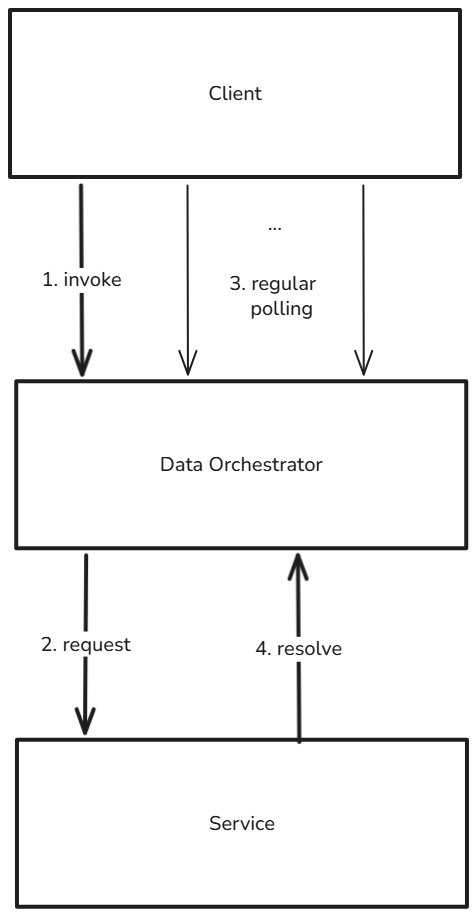
The flow for asynchronous datapoints is as follows:
- The asynchronous datapoint gets invoked.
- The Data Orchestrator sends the datapoint request to the third-party service configured in the datapoint.
- Usually a client regularly polls to receive the response of the invocation.
- At some point the third-party service informs the Data Orchestrator about its success or error result. At this point, client polls can receive the resolved result from the datapoint invocation.
To notify the Data Orchestrator about finalization, the third-party service sends a request to its resolve URL.
Example
In this example, Bruno calls the Data Orchestrator to resolve a request successfully and provide the response data. See also Invoke Connectivity for more details on calling connectivity using Bruno.
meta {
  name: resolve connectivity
  type: http
  seq: 2
}

post {
  url: {{envURL}}data-orchestrator/v1/resolve
  body: json
  auth: inherit
}

body:json {
  {
    "jobID": "{{jobID}}",
    "result": {
      "success": true,
      "data": {
        "mytext": "myResponseString"
      }
    }
  }
}

docs {
  Resolves an asynchronous datapoint and informs about its response.
}
Cancelling long running datapoints and workflows
For both long running asynchronous datapoints as well as for workflows it can make sense to cancel their execution preliminary to free up resources, prevent erroneous executions, etc.
To do so, a request has to be sent to the Data Orchestrator's /cancel URL.
Cancel requests can be sent for each invokable connectivity element - e.g. Datapoints, Connectors and Workflows.
Example
In this example Bruno request the Data Orchestrator gets asked to cancel further executions and waiting on the job with the given ID.
meta {
  name: cancel connectivity
  type: http
  seq: 2
}

post {
  url: {{envURL}}data-orchestrator/v1/cancel
  body: json
  auth: inherit
}

body:json {
  {
    "jobID": "{{jobID}}"
  }
}

docs {
  Cancels the invocation.
}